Hi all !
Here is a short project I did for Dewaele, a simple 360° turnaround of a house in Belgium. I tried to give the vegetation as less repetition as I could, just worked on several bushes and proxied them. Trees are also lightly shaked by a soft wind.
I hope you like that !
Mike
Showing posts with label VrayForC4D. Show all posts
Showing posts with label VrayForC4D. Show all posts
March 26, 2012

February 7, 2012
Still Stills
Some more of my work for Asymetrie (excepted room modeling).


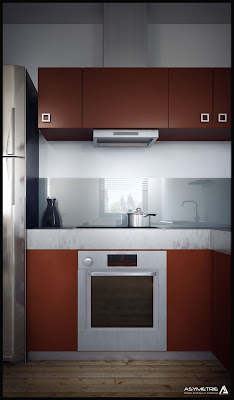
Soon to come a real time (not 8x speed, I promise :p) postwork tutorial on an exterior still rendering.
Mike


Soon to come a real time (not 8x speed, I promise :p) postwork tutorial on an exterior still rendering.
Mike
November 23, 2011
Some more Stills
Hi all,
Here are images I did (except room's modeling) for an hotel project.


And for a smaller one


Comment as much as you want !
M!ke
Here are images I did (except room's modeling) for an hotel project.


And for a smaller one


Comment as much as you want !
M!ke
May 15, 2011
EasyArea plugin
Hi all !
This little plugin places an area light within a selection of 4 points (rectangular is better ... obviously).
This already exists on 3dsmax and Tong suggested me to code an equivalent for us...
EasyArea Plugin from Mike Barrin on Vimeo.
DOWNLOAD HERE
P.S :
1 - Beware to non-uniformely scaled object.
2 - Orientation must be set by hand for single sided areas.
Enjoy !
M!ke
This little plugin places an area light within a selection of 4 points (rectangular is better ... obviously).
This already exists on 3dsmax and Tong suggested me to code an equivalent for us...
EasyArea Plugin from Mike Barrin on Vimeo.
DOWNLOAD HERE
P.S :
1 - Beware to non-uniformely scaled object.
2 - Orientation must be set by hand for single sided areas.
Enjoy !
M!ke
February 20, 2011
Work of november 2011
A work I did @ work, the goal was to seduce and show to future workers what would look like their office building. This is in Charleroi / Belgium.
There was quite a lots of issues due to the massive vegetal walls. I used lots and lots of proxies and some compositing to dodge RAM leaks ... Total rendering time about 1500 hours.
Building Renovation from Mike Barrin on Vimeo.
You can comment !
Mike
There was quite a lots of issues due to the massive vegetal walls. I used lots and lots of proxies and some compositing to dodge RAM leaks ... Total rendering time about 1500 hours.
Building Renovation from Mike Barrin on Vimeo.
You can comment !
Mike
February 5, 2011
Rename Vray Lights by Type
Little plugin asked by a VrayC4D user to automatically rename lights upon their type.
Simply unpack it in your plugin folder. Access it from the plugin menu.
P.S. : only works on the 3 first levels of hierarchy ... but, this should be enough ...

M!ke
Simply unpack it in your plugin folder. Access it from the plugin menu.
P.S. : only works on the 3 first levels of hierarchy ... but, this should be enough ...

M!ke
Sun Manipulator
This is a XPRESSO based helper to easily place the sun where you want. It replaces the unreadable dot with little stroke by an arrow, and offers hud controls to adjust sun vertical angle, sun distance, and sun orientation.
By default it contains a Vray Sun tag, but you can tweak it on your will.

Really handy and usefull, test it !
M!ke
By default it contains a Vray Sun tag, but you can tweak it on your will.

Really handy and usefull, test it !
M!ke
AutoID Plugin
Here is simple C.O.F.F.E.E. Plugin that may look useless for many of you but helps me to save some time when I want to work with material IDs. It does attributes different material Ids to all your materials automatically.
DOWNLOAD
AutoID plugin from Mike Barrin on Vimeo.
DOWNLOAD
Subscribe to:
Posts (Atom)