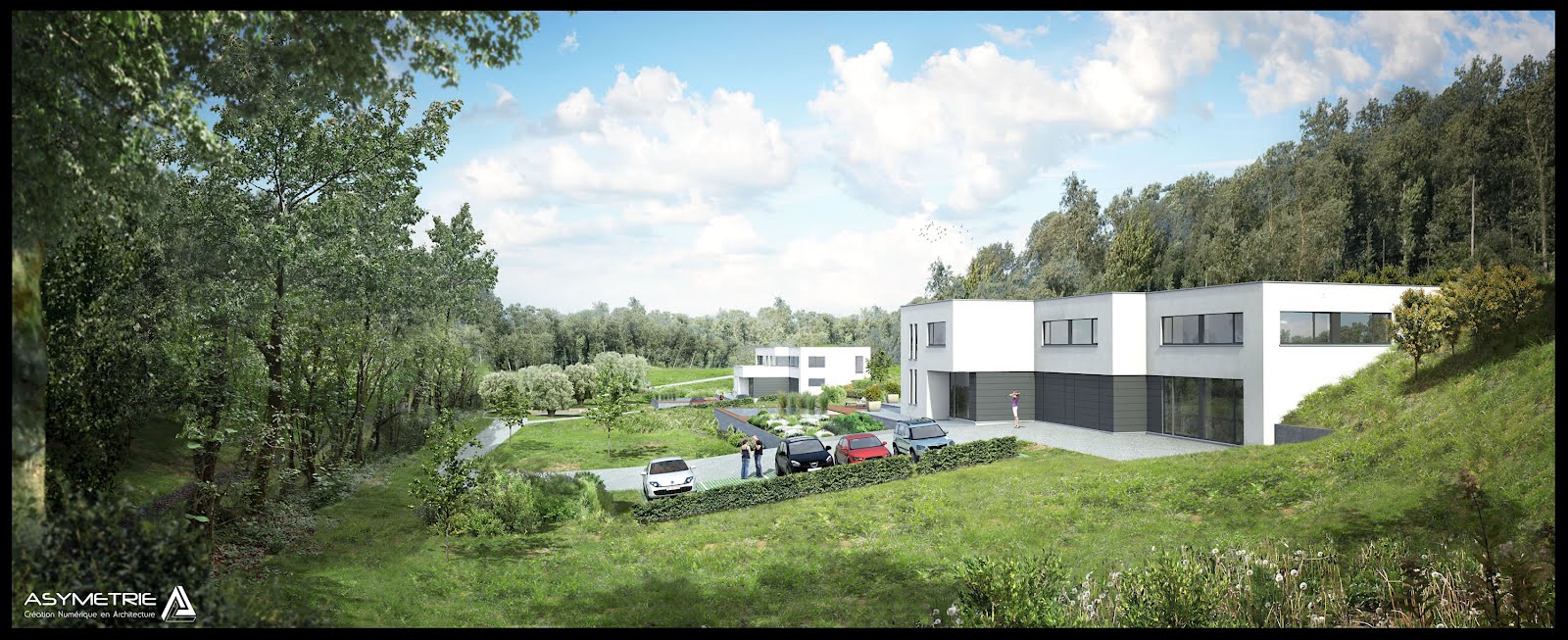
Hi all ! Here is our latest work. I hope you'll enjoy it !
Mike
Welcome to this blog, It is mainly dedicated to Cinema4d, VrayC4D and Photoshop. What you will find here is C.O.F.F.E.E scripts, Xpresso helpers, Photoshop scripts and some plugins. Maybe some objects or other stuff here and there. However, there is no real limit to what can be found in this place.
May 29, 2013
March 29, 2012
Quiet housing
Hi all, here are some more images with quite heavy postwork.
Base renderings were made by a colleague on Artlantis.
It was a lot of fun to make this. Original composition width around 6000px - 7000px.
Mike
Base renderings were made by a colleague on Artlantis.
It was a lot of fun to make this. Original composition width around 6000px - 7000px.
Mike
March 26, 2012
360° House
Hi all !
Here is a short project I did for Dewaele, a simple 360° turnaround of a house in Belgium. I tried to give the vegetation as less repetition as I could, just worked on several bushes and proxied them. Trees are also lightly shaked by a soft wind.
I hope you like that !
Mike
Here is a short project I did for Dewaele, a simple 360° turnaround of a house in Belgium. I tried to give the vegetation as less repetition as I could, just worked on several bushes and proxied them. Trees are also lightly shaked by a soft wind.
I hope you like that !
Mike
February 7, 2012
Still Stills
Some more of my work for Asymetrie (excepted room modeling).
Soon to come a real time (not 8x speed, I promise :p) postwork tutorial on an exterior still rendering.
Mike
Soon to come a real time (not 8x speed, I promise :p) postwork tutorial on an exterior still rendering.
Mike
From scratch to viz
Sometimes fun to compare clients sketches and results.
I haven't stopped this blog I only have important family life projects since a few months, I'll be back to really update this blog and post tutorials soon.
Mike
I haven't stopped this blog I only have important family life projects since a few months, I'll be back to really update this blog and post tutorials soon.
Mike
November 23, 2011
Some more Stills
Hi all,
Here are images I did (except room's modeling) for an hotel project.
And for a smaller one
Comment as much as you want !
M!ke
Here are images I did (except room's modeling) for an hotel project.
And for a smaller one
Comment as much as you want !
M!ke
June 15, 2011
Session #4 Basic Ivy painting in Photoshop
As promised here is a short explaination of how ivy is painted in the complete postwork session. This is a fun technic that can be used for many things.
Enjoy !
M!ke
Enjoy !
M!ke
June 8, 2011
Watch & learn : Postprod work from A to Z
Hi all !
Here is a complete post work form me at 8x speed. This is not a real tutorial as nothing is really explained. Anyway, it shows a full process of 3d architectural integration, with different basic techniques and processes.
This job was made for Asymetrie, the project is from one of our customers.
For those interested, notice that I offer my postwork services, if you or your studio love 3d and want to get a nice postwork job, do not hesitate to contact me @ mike_barrin-at-hotmail.com.
Feel free to give your opinion, critics, advises, or even bank card details ;)
Make me know if you liked it.
M!ke
Here is a complete post work form me at 8x speed. This is not a real tutorial as nothing is really explained. Anyway, it shows a full process of 3d architectural integration, with different basic techniques and processes.
This job was made for Asymetrie, the project is from one of our customers.
For those interested, notice that I offer my postwork services, if you or your studio love 3d and want to get a nice postwork job, do not hesitate to contact me @ mike_barrin-at-hotmail.com.
Feel free to give your opinion, critics, advises, or even bank card details ;)
Make me know if you liked it.
M!ke
May 25, 2011
Session #3 Extract Plugin/Filter & High Contrast Cutout in Photoshop
Following tutorial shows 2 fast and efficient technics of cutting out skies or other things.
The Extract Plugin/Filter can be found Here at :
for windows : http://www.adobe.com/support/downloads/detail.jsp?ftpID=4048
for mac : http://www.adobe.com/support/downloads/detail.jsp?ftpID=4047
Do no hesitate to ask questions, request tutorials or comment !
M!ke
The Extract Plugin/Filter can be found Here at :
for windows : http://www.adobe.com/support/downloads/detail.jsp?ftpID=4048
for mac : http://www.adobe.com/support/downloads/detail.jsp?ftpID=4047
Do no hesitate to ask questions, request tutorials or comment !
M!ke
May 24, 2011
Some work
Here are samples of past work done with Asymetrie.
This one is full VrayForC4D except room modeling that was done by a colleague.
For the two following, I've only done the postwork job : adding, vegetals, people, mood, fixing details.
Give your opinion !
M!ke
This one is full VrayForC4D except room modeling that was done by a colleague.
For the two following, I've only done the postwork job : adding, vegetals, people, mood, fixing details.
Give your opinion !
M!ke
May 23, 2011
Session #2 Basic shadow casting in Photoshop
Here is the 2nd tip and tricks. This one shows a way to simulate shadow casting of a cutout tree. What you should keep in mind is that this is only one method among many others, which is not supposed to be physically accurate.
I must first show some basic tricks... We'll really get into it later ;).
Do not hesitate to share / comment.
Mike
I must first show some basic tricks... We'll really get into it later ;).
Do not hesitate to share / comment.
Mike
May 15, 2011
Display by frame
Little C.O.F.F.E.E script that allow to change objects every frame.
It's quite simple :
It compares the name of the group with the number of the frame and if it matches, the group is displayed.
Simply create a C.O.F.F.E.E tag with the following code on Nulls (groups) witch name are corresponding to the frame during witch they'll be activated (!?!)
****************************************
main(doc,op)
{
var dirframe = op->GetName(); //gets group name
var test = int(evaluate(dirframe)); //converts group name to int
var t = doc->GetTime(); //get current frame
var frame = t->GetFrame(doc->GetFps()); //get current frame
if(test==frame){ //if group's name = frame number ---> group is active
op#ID_BASEOBJECT_VISIBILITY_EDITOR=2;
op#ID_BASEOBJECT_VISIBILITY_RENDER=2;
}
else{ //else group is disabled
op#ID_BASEOBJECT_VISIBILITY_EDITOR=1;
op#ID_BASEOBJECT_VISIBILITY_RENDER=1;
}
}
**************************************
Check example file here ---> DISPLAY BY FRAME
Might be used or tweaked for other uses.
Mike
It's quite simple :
It compares the name of the group with the number of the frame and if it matches, the group is displayed.
Simply create a C.O.F.F.E.E tag with the following code on Nulls (groups) witch name are corresponding to the frame during witch they'll be activated (!?!)
****************************************
main(doc,op)
{
var dirframe = op->GetName(); //gets group name
var test = int(evaluate(dirframe)); //converts group name to int
var t = doc->GetTime(); //get current frame
var frame = t->GetFrame(doc->GetFps()); //get current frame
if(test==frame){ //if group's name = frame number ---> group is active
op#ID_BASEOBJECT_VISIBILITY_EDITOR=2;
op#ID_BASEOBJECT_VISIBILITY_RENDER=2;
}
else{ //else group is disabled
op#ID_BASEOBJECT_VISIBILITY_EDITOR=1;
op#ID_BASEOBJECT_VISIBILITY_RENDER=1;
}
}
**************************************
Check example file here ---> DISPLAY BY FRAME
Might be used or tweaked for other uses.
Mike
EasyArea plugin
Hi all !
This little plugin places an area light within a selection of 4 points (rectangular is better ... obviously).
This already exists on 3dsmax and Tong suggested me to code an equivalent for us...
EasyArea Plugin from Mike Barrin on Vimeo.
DOWNLOAD HERE
P.S :
1 - Beware to non-uniformely scaled object.
2 - Orientation must be set by hand for single sided areas.
Enjoy !
M!ke
This little plugin places an area light within a selection of 4 points (rectangular is better ... obviously).
This already exists on 3dsmax and Tong suggested me to code an equivalent for us...
EasyArea Plugin from Mike Barrin on Vimeo.
DOWNLOAD HERE
P.S :
1 - Beware to non-uniformely scaled object.
2 - Orientation must be set by hand for single sided areas.
Enjoy !
M!ke
March 25, 2011
Postprod work
Here are some images for a recent project.
In this very case my job was only postproduction including every vegetation, people placing, general mood and some fixes. This is only photoshop work. I was thinking about creating some postproduction tutorials. Let me know if you would be interested.
Mike
In this very case my job was only postproduction including every vegetation, people placing, general mood and some fixes. This is only photoshop work. I was thinking about creating some postproduction tutorials. Let me know if you would be interested.
Mike
February 20, 2011
Session #1 Materials replacement
Ok here is my first real "tutorial". It shows different ways to change/replace materials in cinema4D. Most of them are basic, but it's a good lessons for beginners, and maybe you'll find something you didn't knew. Sorry for text and images timing... once more it'll be fixed once i'll use audio.
Session #1 Material changing methods from Mike Barrin on Vimeo.
If you find it usefull or stupid, do not hesitate to say it !!
M!ke
Session #1 Material changing methods from Mike Barrin on Vimeo.
If you find it usefull or stupid, do not hesitate to say it !!
M!ke
Work of november 2011
A work I did @ work, the goal was to seduce and show to future workers what would look like their office building. This is in Charleroi / Belgium.
There was quite a lots of issues due to the massive vegetal walls. I used lots and lots of proxies and some compositing to dodge RAM leaks ... Total rendering time about 1500 hours.
Building Renovation from Mike Barrin on Vimeo.
You can comment !
Mike
There was quite a lots of issues due to the massive vegetal walls. I used lots and lots of proxies and some compositing to dodge RAM leaks ... Total rendering time about 1500 hours.
Building Renovation from Mike Barrin on Vimeo.
You can comment !
Mike
February 11, 2011
Automatic diffuse.jpg + alpha.jpg to TIF
When you buy collections of plants, people, trees or whatever on the web, you often receive (for a reason of web transfert I suppose) 2 JPGS, one with alpha and the other with diffuse... So to get a transparent TIF, you first need to open the diffuse, put the alpha on it, select channel, delete, save ... etc etc ... ok for 1, let's say 2, 3 , 10 images... but when there are hundreds, it's a real timeloss ... Here is a little script that'll quickly do the job for you ... Let's see it in action first :
Well sorry, no audio yet, but it'll come soon !
Ok ... For those who are still interested, there is a little setup to do first ...but once it's done... it's really quick.
Well sorry, no audio yet, but it'll come soon !
Ok ... For those who are still interested, there is a little setup to do first ...but once it's done... it's really quick.
February 8, 2011
February 5, 2011
My good old 2008 Demoreel
My good old 2008 Demoreel from Mike Barrin on Vimeo.
Little bit of nostalgia with my 2008 matte painting & FX demoreel :)
Many others examples and making of can be found on my old website
M!ke
Subscribe to:
Posts (Atom)